






If you enjoy building things in Salesforce, the Platform App Builder certification is worth keeping on your radar. It’s all about taking business requirements and turning them into custom applications using Salesforce’s declarative tools, covering everything from data models and security to user interfaces, automation, and reporting.
The exam covers more than just knowing where to click, though. You’ll also need to understand mobile experiences, application lifecycle management, deployment, and when different approaches are most appropriate. In this guide, we’ll walk through everything you need to know to prepare for the Platform App Builder exam.
About the Salesforce Platform App Builder Certification
Here’s what you need to know ahead of the exam:
- The exam consists of 60 multiple-choice/multiple-select questions (plus five non-scored questions).
- You will have 105 minutes to complete the exam.
- The passing score is 73% (increased from 68%).
- There are no prerequisites to take this exam.
- The exam can be taken online or at a testing center.
- The exam costs $200, and retakes cost $100.
Who’s the Ideal Candidate?
The Salesforce Platform App Builder certification is aimed at professionals who build custom applications using Salesforce’s declarative tools. They understand how to turn business requirements into scalable applications by working with data models, security, business logic, automation, and reporting.
App Builders should also understand the wider Salesforce Platform, including licensing, mobile capabilities, development environments, and deployment options. Typically, candidates have around 6 to 12 months of experience building applications on Salesforce or a similar platform.
Key areas of knowledge include:
- Declarative development: Building and maintaining custom applications using Salesforce’s point-and-click tools.
- Data and business logic: Designing data models, configuring security, automation, and business processes.
- Platform knowledge: Understanding Salesforce capabilities, licensing considerations, and how the platform fits together.
- Solution design: Creating applications that meet specific business and reporting requirements.
- Mobile: Understanding how Salesforce applications work across mobile devices.
- Deployment: Working with development environments and Salesforce’s change and deployment options.
The certification is particularly relevant for Salesforce Administrators, Business Analysts, Application Builders, Product or ISV Developers, and Salesforce Architects, with Developers, Mobile App Developers, Database Analysts, IT Systems Analysts, and BI Analysts also likely to benefit.
Salesforce Platform App Builder Exam Topics & Weighting
Salesforce exams are made up of different topics, with different weightings for each. It’s important to pay attention to these, as just a few sections will most likely take up the majority of the exam.
The Salesforce Platform App Builder will test your knowledge on:
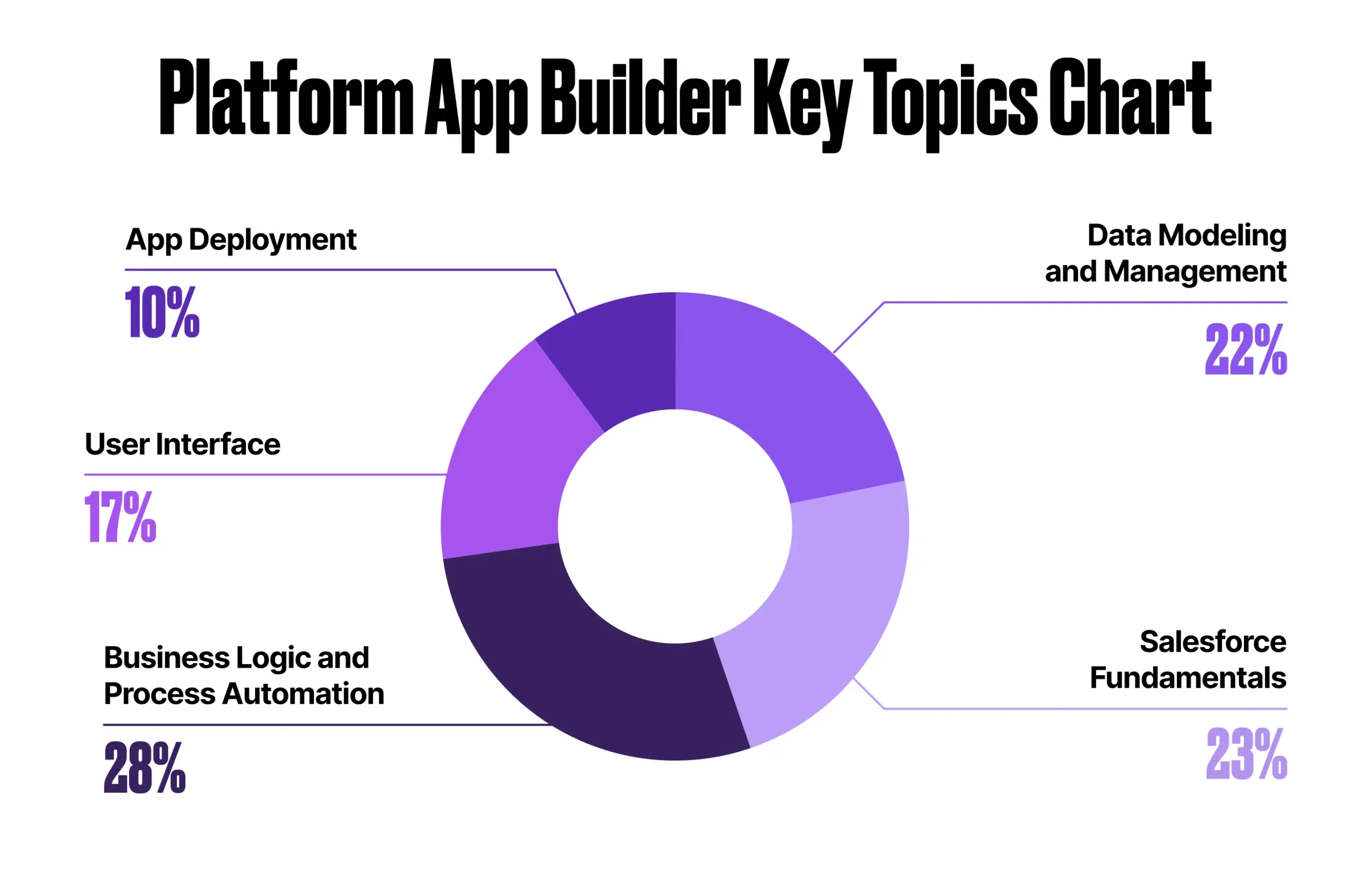
1. Salesforce Fundamentals: 18%
You’ll recognise some of this content from the Platform Administrator exam, particularly around security, sharing, reports, and dashboards. This time, you’ll need to apply that knowledge to specific scenarios and business requirements.
You’ll also need to understand where declarative customization reaches its limits, when programmatic customization is the better option, and when an org can be extended using the AgentExchange.
Make sure you’re comfortable with the different ways to restrict and extend access to objects, records, and fields, as well as choosing the right sharing solution, such as sharing rules, for a given requirement. You should also understand the key features available when creating reports, report types, and dashboards.
2. Data Modeling & Management: 20%
This section focuses on how Salesforce data is structured and managed, from choosing the right data model to understanding relationships, fields, and external data.
You’ll need to understand how different relationship types affect record access, the user interface, and reporting, and be able to choose the right approach for a given scenario. Pay special attention to many-to-many relationships.
Field data types are another key area. Make sure you understand the considerations when choosing or changing a field type, including any potential impact on your existing data.
Finally, brush up on importing and exporting data, including the tools available, key considerations, and how external data sources can be used.
3. Business Logic & Process Automation: 32%
This is a big section of the exam, so make sure you’re comfortable choosing the right automation or business logic solution for a given scenario.
You’ll need to know how formula fields, roll-up summary fields, and validation rules can be used to meet business requirements, as well as how to build and configure flows in Flow Builder.
Flow knowledge goes beyond simply creating one. You should understand the different flow types, Flow Approval processes, and how to monitor and troubleshoot your flows.
You’ll also need to understand how Agentforce can be used to automate business processes and where it fits alongside traditional Salesforce automation.
4. User Interface: 17%
This section is about creating a Salesforce experience that works well for users, both on desktop and mobile.
You’ll need to understand the different options available for customizing the user interface, including custom buttons, links, actions, and Lightning components. Pay particular attention to when Lightning components can be added declaratively and when programmatic customization is required.
You should also understand global and object-specific actions and layouts, and how to use them to create a better Salesforce mobile experience.
5. App Deployment: 13%
This may be the smallest section of the exam, but don’t overlook it. You’ll need to understand how to manage changes throughout the application lifecycle, from development and testing through to deployment.
Make sure you’re familiar with the different sandbox types and how to choose the right approach for a given requirement. You should also understand when change sets are appropriate, how to troubleshoot them, and the differences between managed and unmanaged packages.
Finally, be prepared to recommend an appropriate deployment plan based on a set of business requirements.
How to Study for the Platform App Builder Exam
The Salesforce Certified Platform App Builder might seem daunting if you’re just entering the world of Salesforce. However, breaking it down into individual sections makes it much more manageable. Here’s a comprehensive study strategy to help you prepare effectively…
1. Start With the Official Exam Guide
Begin by checking out the official Salesforce exam guide. This resource provides a detailed outline of all the concepts you need to be familiar with before taking the exam. Use this guide as your revision plan:
- Segment Your Study: Break down the guide into manageable sections.
- Track Your Progress: Tick off each section once you fully understand the concepts.
2. Utilize Trailhead for Learning and Practice
Salesforce’s online learning platform, Trailhead, is an invaluable tool for your study plan:
- Explore Relevant Modules: Engage with Trailhead modules related to the exam. These modules cover the features in depth and provide real-time feedback through challenges.
- Hands-On Practice: Beyond theoretical learning, test the features in a Developer Org or Trailhead Playground. Experiment with these features to understand their limitations and practical applications.
3. Follow Structured Learning Paths
For comprehensive hands-on experience, follow this recommended trail on Trailhead:
4. Understand the Exam Structure
Familiarizing yourself with the exam structure is crucial for effective preparation:
- Multiple-Choice Format: Salesforce exams typically feature multiple-choice questions.
- Pattern Recognition: The exam usually includes one correct answer, several incorrect ones, and one that seems correct but isn’t best practice. Recognizing this pattern will help you avoid common pitfalls.
- Practice Exams: Take practice exams to simulate the real test environment. These exams are designed to reflect the actual exam’s format and difficulty, helping you get accustomed to the question types and timing.
5. Continuous Review and Practice
- Revisit Difficult Topics: Regularly review sections you find challenging to reinforce your understanding.
- Join Study Groups: Collaborate with others preparing for the exam. Study groups can provide support, additional resources, and different perspectives on difficult concepts.
- Stay Updated: Salesforce updates its platform regularly. Ensure you stay current with any changes that might affect the exam content.
By following this structured strategy, you can approach your Salesforce Platform App Builder certification exam with confidence. Remember to leverage the vast resources available through Trailhead, engage in hands-on practice, and familiarize yourself with the exam format to maximize your chances of success.
Exam Strategy
When exam day finally arrives, implementing effective strategies can significantly enhance your chances of passing with flying colors. Here are some proven tips to help you succeed…
Before the Exam
- Review and Memorize Key Concepts:
- Create a cheat sheet for any challenging concepts. Review and try to memorize these right before the exam to keep them fresh in your memory.
- Engage in last-minute cramming using topic-level practice exams, focusing on areas where you feel less confident. This targeted review can reinforce your knowledge.
During the Exam
- Carefully Read Each Question:
- Pay particular attention to each question and read it multiple times. Scenario-based questions often contain key clues within the text that can guide you to the correct answer.
- Utilize Provided Tools:
- If you are taking the exam at a test center, make good use of the pen and paper provided. Drawing out data schemas, role hierarchies, or other diagrams can help you visualize and solve complex problems more effectively.
- Process of Elimination:
- Use the process of elimination to discard answers that are definitely incorrect. Salesforce exams often include distractors that are either fictional features or incorrect interpretations of real features.
- Be cautious of curveballs – answers that seem correct but are not aligned with best practices. Focus on standard Salesforce features to determine the best solution. For example, while you can create a custom approval process with Process Builder, using the standard approval process feature is often the best practice.
- Mark for Review:
- Take advantage of the “Mark for review” feature. If you are unsure about a question or need more time to think, mark it for review and return to it later. This helps manage your time effectively and ensures you don’t get stuck on difficult questions.
After Completing the Exam
- Review Your Answers:
- If time permits, review all your answers, not just the ones marked for review. This comprehensive review can help you catch mistakes and make necessary corrections.
- Pay special attention to the questions you marked for review. Re-evaluating these questions with a fresh perspective can lead to more accurate answers.
- If in doubt, stick with your initial answer (you probably know more than you think!).
Resources
- Salesforce Platform App Builder Exam Guide
- Trailmix: Prepare for Your Salesforce Platform App Builder Certification
- Superbadge: Object Relationships Superbadge Unit
- Superbadge: User Access Fundamentals Superbadge Unit
- Superbadge: Formulas Superbadge Unit
- Superbadge: Data Quality and Validation Unit
- Superbadge: Flow Fundamentals Superbadge Unit
Tips
- Download the Trailhead Exam Guide and use this as your master revision list
- Ensure you not only revise the features and concepts, but thoroughly test them out in a Developer Org or a Trailhead Playground.
- Once you feel confident with some of the modules, book your exam to give you a date to aim towards. This will give you the motivation to revise and pass the exam.
Final Thoughts
In my opinion, the Platform App Builder certification is almost as valuable as the Salesforce Admin certification and makes a great next step in your certification journey.
The exam covers many of the platform fundamentals you’ll already be familiar with, but takes them a step further. You’ll build your understanding of Salesforce architecture, application design, and scalability, while also learning to recognise when you’ve reached the limits of a declarative solution and need to consider a programmatic approach. It also puts greater emphasis on deployment and the wider capabilities of the platform, giving you a much better understanding of how all the pieces fit together.





Comments: